Run your pasabuy like a real business.
Not a messy group chat.
Take orders, shop abroad, ship home, hand over to customers — and actually know what you earned on every haul. Built by a pasabuy seller, for pasabuy sellers.
A look inside KUAN
Watch the key features in action. Each clip is about 10 seconds.
Know what's selling
Real-time sales stats, profit margins, and best sellers — filterable by date.
Your whole pasabuy cycle, in one app
From the first customer request to the final handover — KUAN follows the way pasabuy actually works, not the way a generic store app assumes it does.
Built by a developer who runs pasabuy hauls himself — sourcing in Europe, delivering to customers in Asia. Every step here is one I needed and couldn't find anywhere else.
Take orders without losing them
A customer wants something from abroad — log it the moment they ask. No more scrolling back through chats trying to remember who wanted which size, color, or quantity. Every request is captured against the customer who made it.
Shop abroad and scan as you go
Wherever you're sourcing — Korea, Japan, Dubai, Singapore, the US — scan each item into a cargo as you buy it. Record what you actually paid in the local currency. KUAN keeps your costs straight even when you're buying in three currencies on one trip.
Ship the box home
Mark the cargo as in transit. Items show in your inventory at zero stock, so you always know exactly what's on the way, what it cost, and which customer orders it's covering — without confusing it with stock you already have at home.
Hand over and get paid
When the box lands, one tap moves everything into your active inventory. Match items to the customers who ordered them, mark what's paid and what's still owed, and print or share a clean receipt. Nobody gets forgotten, nobody gets double-charged.
See what you actually earned
Whenever you want, pull a business report for any stretch of time: real profit per haul after shipping, your best-selling items, your most profitable trips, and your month-over-month growth — in your own currency. The numbers that tell you whether pasabuy is worth doing full-time.
See your business like a real one
Pick the months you want, tap once, and KUAN builds a complete business report — the kind of numbers most resellers never see until they go pro. Excel export included so you can share with a partner or accountant.
Watch your trajectory, month over month
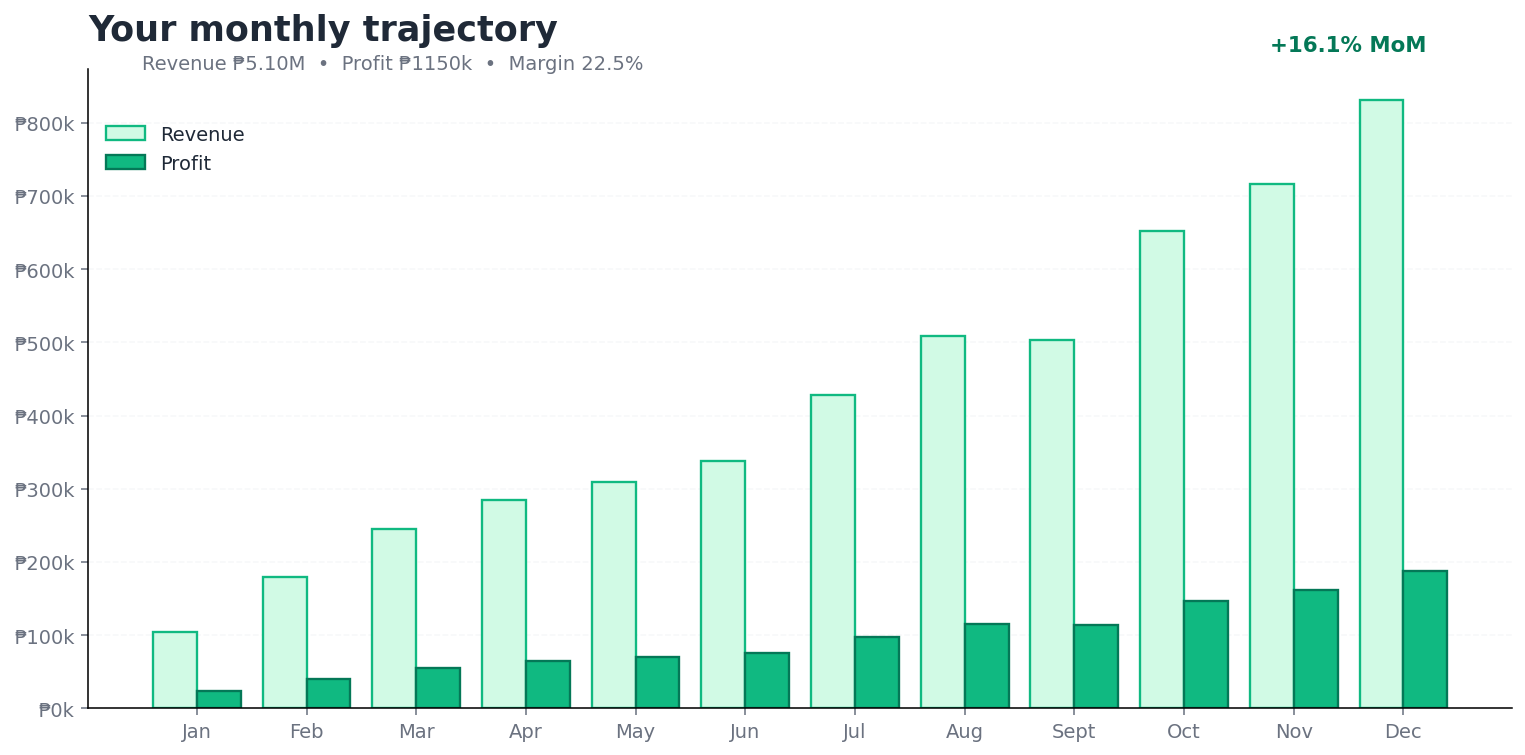
Most sidehustle resellers have no idea if they're growing, plateauing, or quietly going backwards. Select any range of months and KUAN breaks down revenue and profit for each one, with month-over-month growth percentages — the same numbers a real business uses to plan its next quarter. Your history stays saved for a year, so you can always look back — even after a quiet stretch.
- Monthly transactions, units sold, revenue, profit
- Month-over-month growth rates for each metric
- Year-end totals and average margin
Find your winners. Cut your dead weight.
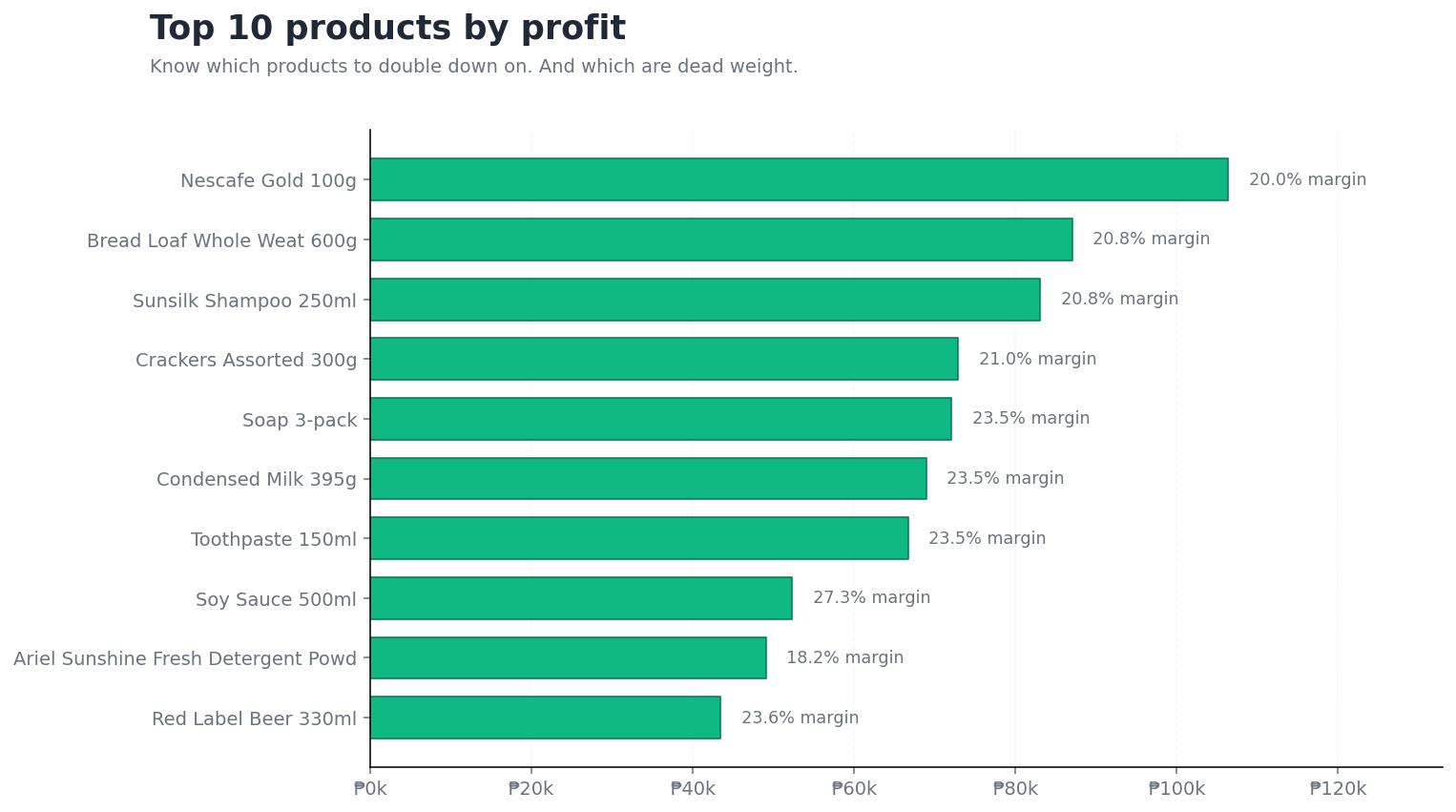
The hardest question for any reseller: which products are actually making money, and which are just tying up capital? KUAN ranks every product by profit, with margin percentages side-by-side, so you can see at a glance where to double down and where to stop ordering.
- Every product ranked by profit (not just units sold)
- Margin percentage next to every item — high-volume low-margin or low-volume high-margin? Both visible
- Same view for brands — see which suppliers actually pay off
Know exactly which shipments made you money
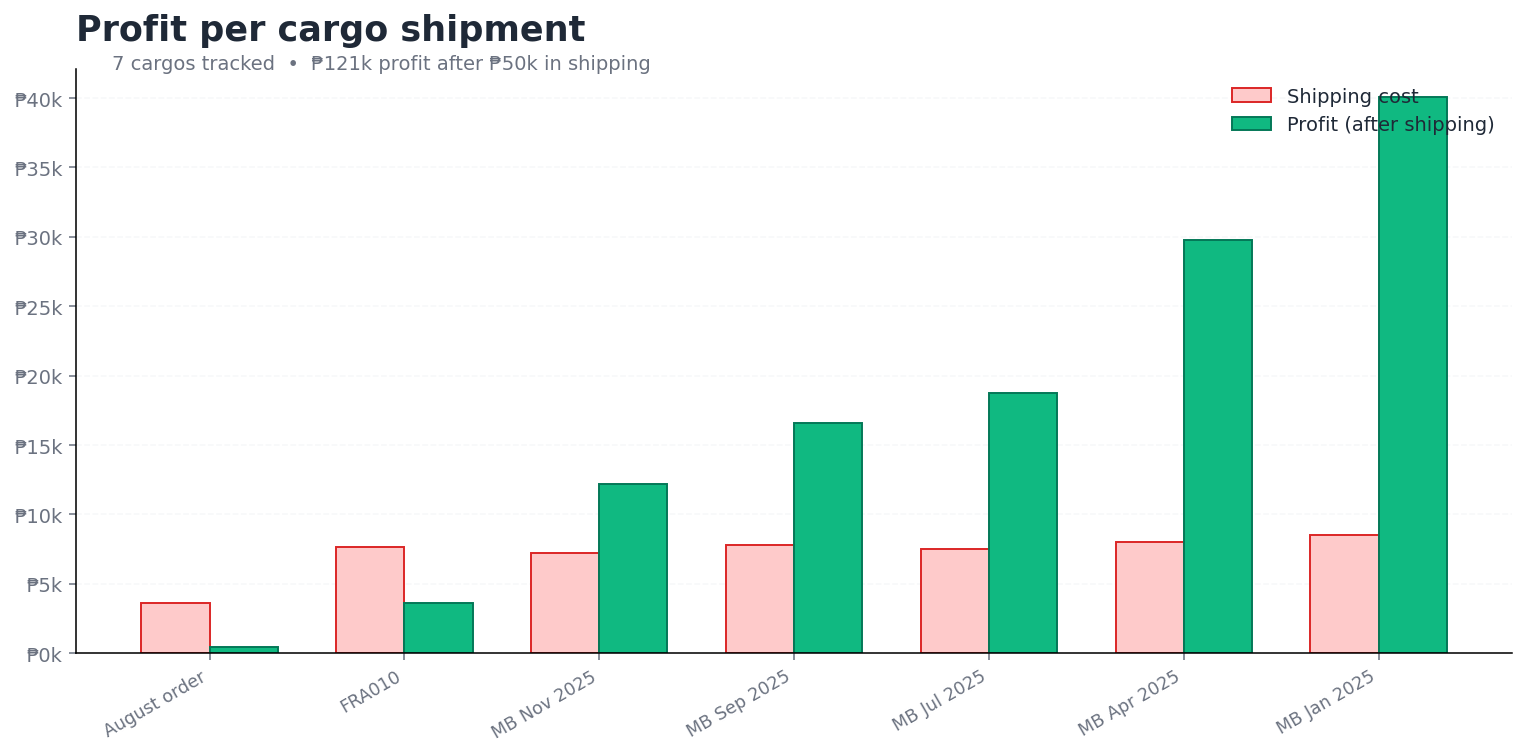
For anyone importing in batches — bulk orders, supplier shipments, freight from China, Korea, or anywhere abroad — KUAN tracks profit per shipment after shipping costs. Sell-through rate, time-to-sell, profit-after-cargo: the numbers that tell you whether to repeat that supplier or never order from them again.
- Profit per cargo (after shipping fees deducted)
- Sell-through % — what arrived vs what actually sold
- Breakeven analysis: how many sales each cargo needs to be worth it
Also included in every report
Get Up & Running in Minutes
Follow these simple steps to set up KUAN Store and start managing your inventory today.
Install KUAN Store, sign up, and set up your first store — no credit card required.
- Download KUAN Store from the App Store (iOS) or Google Play (Android).
- Open the app, enter your email, and create a password.
- Name your store, set your default currency, and optionally a 2nd currency.
- Confirm your email — your 30-day free trial has started.
Add products to your inventory — with or without barcodes. Include prices, cost, and photos.
- From the 'INVENTORY' tab, tap '+ Product'.
- Scan an existing barcode with your camera, or enter details manually.
- Add a photo, set the stock quantity, selling price, and optionally the cost you paid.
- Tap 'CREATE PRODUCT' — it's now in stock.
Point your camera at any barcode to instantly look up a product, adjust stock, or update the price.
- From the 'INVENTORY' tab, tap the 'SCAN PRODUCT' button.
- Point your camera at any product barcode — KUAN shows you the product details instantly.
- Update any detail (stock, price, etc.) and tap 'SAVE PRODUCT'.
Find your products visually, like browsing through a photo catalog.
- From the 'INVENTORY' tab, tap the Catalog button.
- Browse your products using the images you added during creation.
- Filter by item or brand name, or tap a product image to open it.
Ring up a customer at checkout using the built-in POS counter. Print a receipt or share it digitally.
- From the 'SHOP' tab, tap 'Counter' and scan products to add them to the sale.
- Optionally add discounts, a note, or a recipient.
- Input the amount received, tap 'PROCEED', verify the transaction, and tap 'COMPLETE'.
- Print via Bluetooth receipt printer, or tap 'DOWNLOAD' to share a digital receipt.
Group incoming products into cargo shipments. Track what's in transit, and add to inventory on arrival.
- Go to the 'Cargo' tab and tap 'Create Cargo'.
- Name the shipment and add products using the barcode scanner.
- When the box arrives, tap 'Confirm Arrival' — products are added to your live inventory.
See your top sellers, daily revenue, and profit at a glance. Export a complete business report with one tap.
- From the 'SHOP' tab, tap 'Business report'.
- Select the timespan and optionally choose a currency for calculations.
- Tap 'Export' to download a complete Excel file of your sales data.
Want to Print? Here's What Works.
Your phone is all you need — sales summaries export as images you can share instantly. Prefer paper? These Bluetooth printers let you hand customers a printed receipt¹ and label your products with barcodes, ready to scan.
Availability varies by region
These printer models are widely available from different sellers depending on your country. You can purchase them from any supplier (Amazon, Shopee, Lazada, AliExpress, etc.) as long as the model matches:
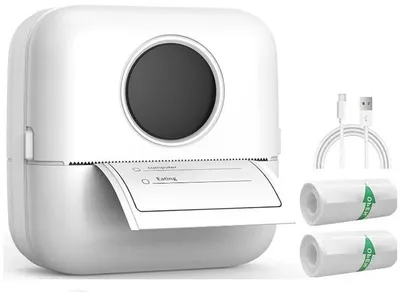
Thermal Pocket Printer X5 (58mm)
Print barcode labels and QR codes directly from the app. Compact and portable. Make sure it looks like the picture shown here.

Label Sticker Rolls (57×25mm)
Adhesive thermal labels for the X5 printer. Stick barcodes directly on your products.
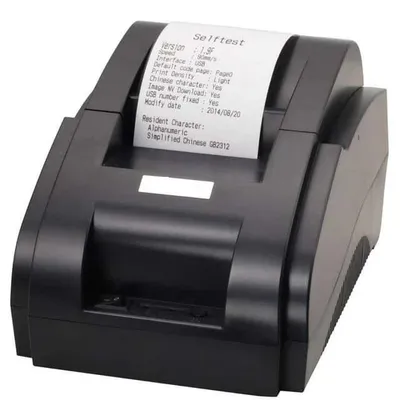
Xprinter JP-58H (58mm)
Print customer sales summaries wirelessly from your phone. Make sure to get the Bluetooth version.

Receipt Paper Rolls (57×30mm)
Thermal paper rolls for the Xprinter JP-58H.
Simple, Transparent Pricing
Start with a free 30-day trial. Upgrade when you're ready.
Loading pricing for your region...
Questions from Personal Shoppers
Real questions from pasabuy, daigou, and jastip sellers who want to run it like a business.
See KUAN in action
Not sure yet? Let us show you around. Tell us a bit about your shop and we'll hop on a quick call — no pressure, no sales pitch. Just a demo tailored to your business.
- Free, no-obligation demo call
- Tailored to your type of business
- Get answers from a real person
- We speak English, Tagalog, Bisaya & Deutsch
We'll get back to you within 24 hours. No spam, ever.
Not doing pasabuy? KUAN also works for online resellers and small importers who buy in batches and want to know their real margins.
See KUAN for resellers